Performance and visual tuning for competitive Android mobile gaming
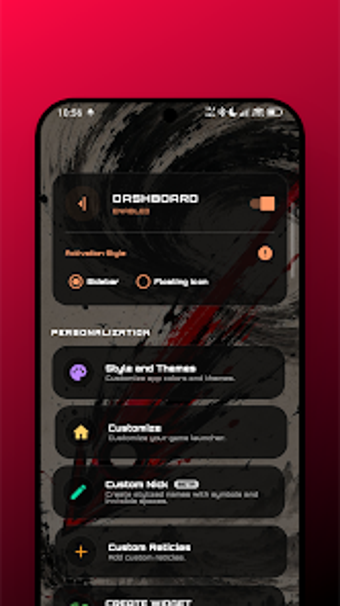
Experience a toolkit for mobile competition with CrossS: game tools from CrossS tec, designed to optimize Android performance for competitive play. The app monitors FPS, temperature, RAM, and CPU through a customizable overlay and lets users change screen resolution, DPI, and create custom crosshairs to alter aiming. It also offers tactile latency testing, gyroscope calibration, an integrated screen recorder, and per-app network blocking. Targeted at competitive mobile gamers and advanced Android users who want granular device control during matches.
What does CrossS do for mobile gamers?
Experience a single suite that merges real-time telemetry with device-level tweaks. The app exposes 1% minimum FPS, temperature, RAM and CPU metrics through an overlay and supplies DPI and resolution adjustments alongside a custom crosshair editor. It also includes an 'iPad view' profile tested for Call of Duty: Mobile and a speaker-cleaning utility. These tools focus on measurable match stability and aiming aids rather than mere cosmetic options.
Does it slow down your device while active?
Real-time overlays and an integrated screen recorder operate concurrently with games, so active modules increase running workload. The app's RAM optimization and cleaning can free memory before matches, but using monitoring, recording, and network-blocking together creates additional background processes. CrossS is designed to run as a system overlay on most modern Android devices, which helps compatibility, but players should enable only the modules they need during critical gameplay to limit extra resource use.
Is it safe to change system settings with the app?
The developer's data safety declaration states the app does not collect or share user data, which reduces privacy concerns about telemetry. At the same time, the presence of an engineer mode and an advanced tweak editor gives the app the ability to make deep system changes. Tactile latency testing and gyroscope calibration are diagnostic tools, and using them requires familiarity with sensor behavior. Advanced users should apply low-level tweaks cautiously.
Do I need technical knowledge to use its advanced options?
Users without technical background should expect a learning curve: the tool is explicitly targeted at competitive mobile gamers and advanced Android users. The developer maintains the app with recent updates, yet public downloads remain limited, so community resources can be sparse. Practical advice: test configuration changes in low-stakes matches or a controlled practice session to confirm behavior on a specific device before using them in ranked play.
Recommendation and single main caveat
CrossS is a capable option for advanced competitive mobile gamers who want hands-on control and are comfortable managing device-level tweaks. The developer actively maintains the app, but a limited number of public downloads makes peer support and shared profiles less common. Expect a learning curve and assess any configuration changes on your own device before relying on them in ranked matches.